

Websites for fitness & yoga studios
A studio website that gets beginners through the door
New students are nervous and comparing three studios. They want to know when the classes are, which ones are for beginners, and what the first visit costs. Answer those and they book.

What visitors come for
The schedule, at a glance
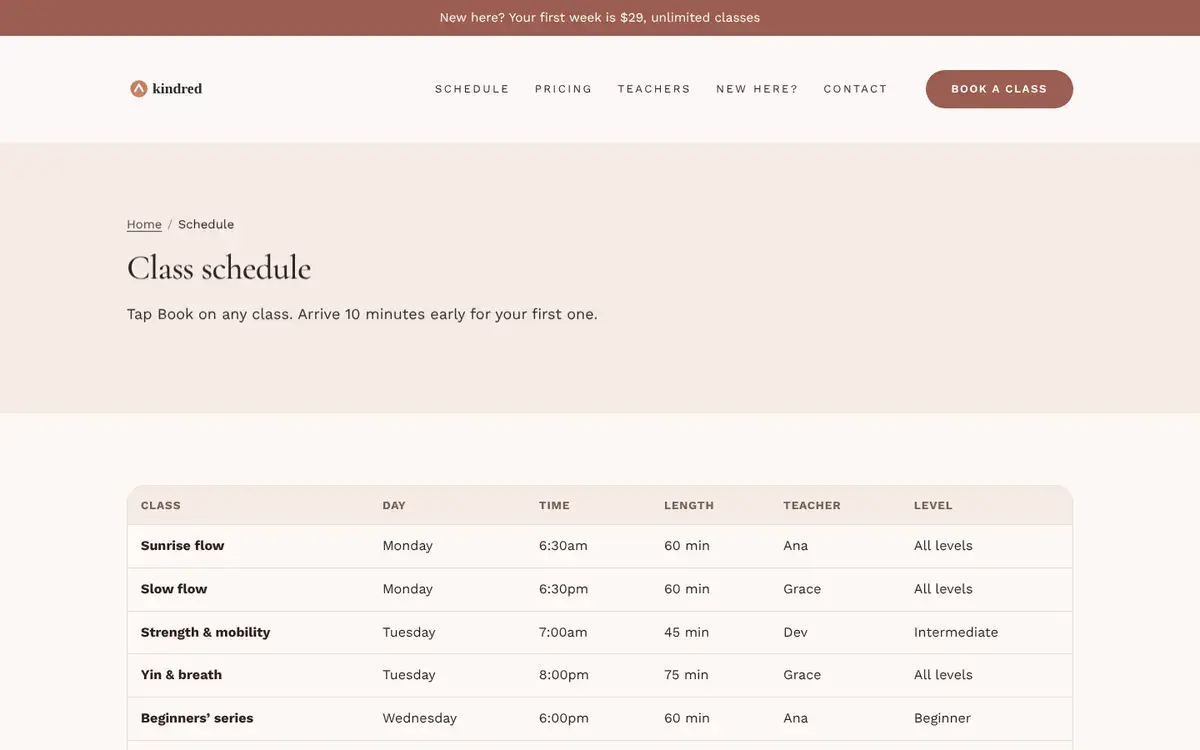
Day, time, teacher, level and length in a table that works on a phone. Change one line when a class moves.
A first-visit offer
An intro week or first class at a clear price, on the home page.
Passes in plain numbers
Drop-in, class packs and memberships side by side, with what each includes.
Who teaches
Short teacher profiles. People come back for a person.
From client work
Mistakes we kept fixing
A booking app as the website
Booking apps are great for checkout, but they’re hard to find on Google and say nothing about your studio. Your site should do that, and link to booking.
The schedule as an image
An Instagram-style timetable can’t be read by search engines or screen readers, and it’s wrong the first time a class changes.
No “new here?” page
What to bring, when to arrive and what happens in class. It’s the page that gets first-timers to book.
Already set up when you start
Class schedule. A weekly timetable with booking links, ready to edit.
Passes and memberships. Pricing cards with a highlighted intro offer.
Teachers. Profiles with photos and what each person teaches.
Your booking app. Mindbody, Momence or any other: add the link once.
Members and newsletters. Sign-ups become contacts you can tag by class. Send the new timetable only to the people it’s for, from your own domain.
Pages you start with: Home · Schedule · Pricing · Teachers · New here? · Contact
How people find fitness & yoga studios on Google
Class types are searched by name
“Hot yoga”, “reformer pilates”: a short page per class type helps you show up for each.
Beginner searches
“Yoga for beginners near me” is common; a “new here?” page answers it.
Schedule on your own site
Embedding your live schedule keeps people on your site instead of a booking app’s directory.
What a yoga or fitness studio website costs
The entry paid plan is usually enough, with the schedule embedded from your booking software. On AgencyX that’s $30 a month for 2 people editing, plus your domain.
Questions owners ask us
Does it replace Mindbody or Momence?
No — it works with them. Your schedule and prices live on your site, and Book buttons go to your booking app.
Can teachers update the schedule?
Yes. A Content editor login lets them change the timetable without touching the design.
Will it show up on Google Maps?
Your business details, hours and address are set up so Google can show them. Pair it with your Google Business Profile.
Start from Kindred Yoga, make it yours.
Free to start. Swap in your name, words and photos; the structure is already right.