Create your website in five steps
Sign up, tell us about your business, pick a look and your colours, and get a ready-to-edit draft website with starter pages — in about five minutes.
On this page
AgencyX builds a first version of your website from a few answers, so you start from real pages for your kind of business instead of a blank screen. Nothing is public until you choose to go live.
Create your account
Go to agencyx.dev and click Start free. Enter your name, email and a password. That's all signup asks for — you'll choose a plan later, if you ever need one.
Tell us about you
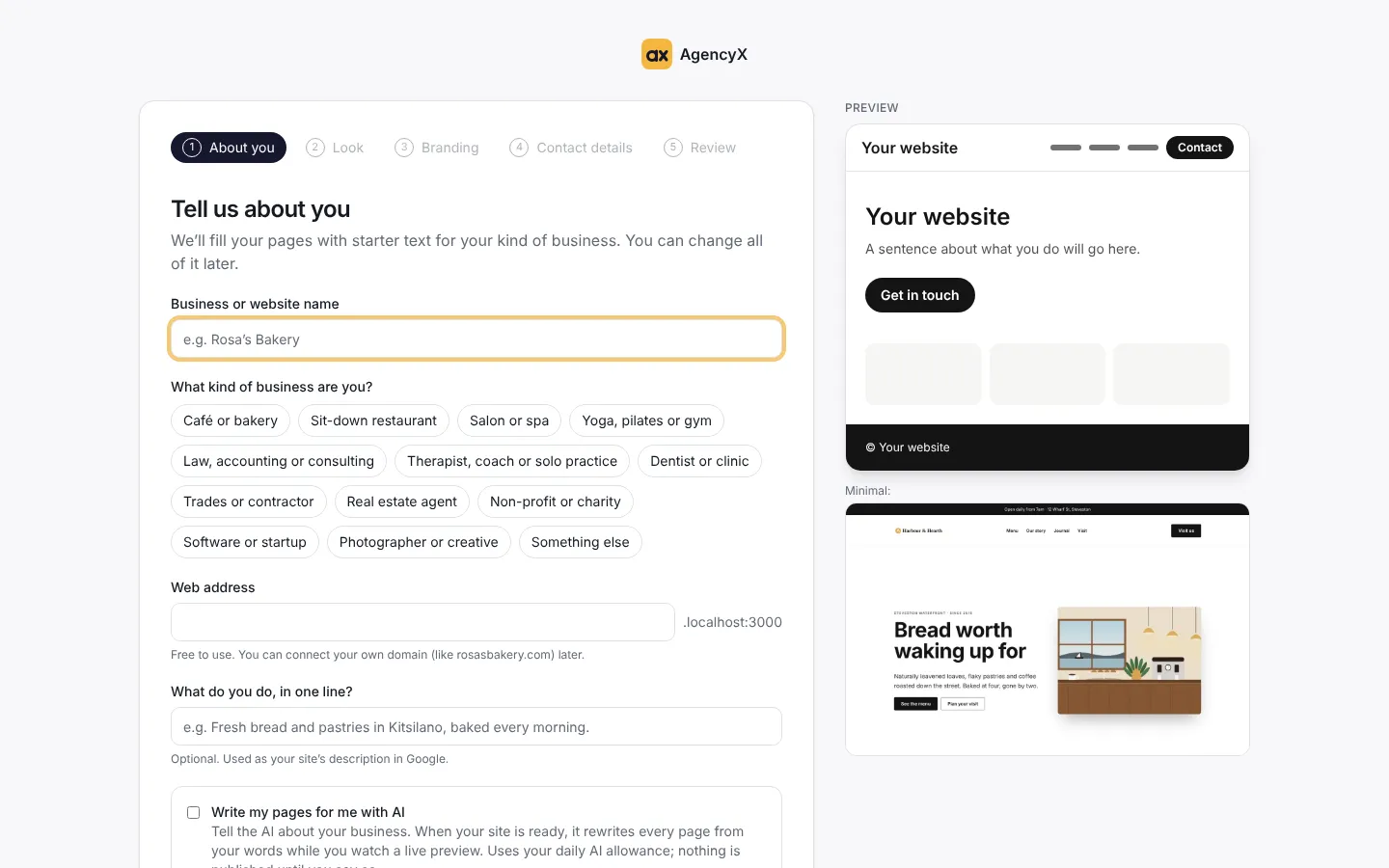
The first setup step, About you, asks for:
- Business or website name — shown in your header, footer and on Google.
- What kind of business — café or restaurant, salon or spa, law/accounting/consulting, dentist or clinic, trades or contractor, software or startup, photographer or creative, or Something else for plain pages. This decides which starter pages and sample text you get.
- Web address — your free address on AgencyX. It's checked as you type, so you'll know straight away if it's taken. You can connect your own domain later.
- What do you do, in one line? — a short description Google can show under your site's name.
Choose a look
The Look step pre-selects the theme made for your kind of business and labels it Made for …. Any other theme is one click away. The preview shows your own pages in the theme you pick.
Add your branding
On Branding, upload your logo (optional) and pick colours: keep the theme's own, choose a ready-made colour set, or enter your brand colour. The preview follows every change.
Add contact details and create the site
Contact details asks for an email, phone number and address — all optional. They're saved to your business profile and used in your footer, contact page and the details Google reads. Opening hours and social links come later, in Settings.
On Review, click to create your site. It's created as a draft and you land on its home screen, the AI assistant.
What happens next
Click Not live yet at the top (or Home → Overview in the menu) for a short Get your site live checklist — add a logo, make the home page yours, add business details, connect a domain and go live. Follow it in order and you'll have a finished site. See Launch your website.
Already have a website on AgencyX?
If you click Use on a theme while signed in, you're asked whether you want a new website or to try it on one of my websites. The second option adds the theme to an existing site as an unpublished theme, so you can preview it on your real pages before switching.
Common questions
Do I need to choose a plan before I start?
No. Signing up only asks for your name, email and a password. Every new website starts on the Free plan, and you can upgrade later from Manage → Plan & billing.
Can I change my answers after the site is created?
Yes. Everything from setup — the theme, colours, logo, contact details and the starter pages — can be changed later in the dashboard.
Will visitors see my site while I build it?
Not until you're ready. A new site starts as a draft that shows a “coming soon” page to visitors and is hidden from search engines.
Something out of date or unclear? Search other guides or tell us from your dashboard.