Connect Claude, ChatGPT, Gemini or another AI provider
Turn on the AI assistant for your website with your own API key from Anthropic, OpenAI, Google, Mistral, xAI, Groq, DeepSeek, OpenRouter and more.
On this page
The AI assistant is the home screen of every website in AgencyX. It works straight away with the built-in AI included in your plan — each editor gets their own daily allowance, reset every night (midnight UTC). A meter under the message box shows how much you have left today.
When you want more, or a particular AI, connect your own key: you choose the AI, the model and the budget, and there's no daily limit. Your key always takes over from the built-in AI; disconnect it to go back.
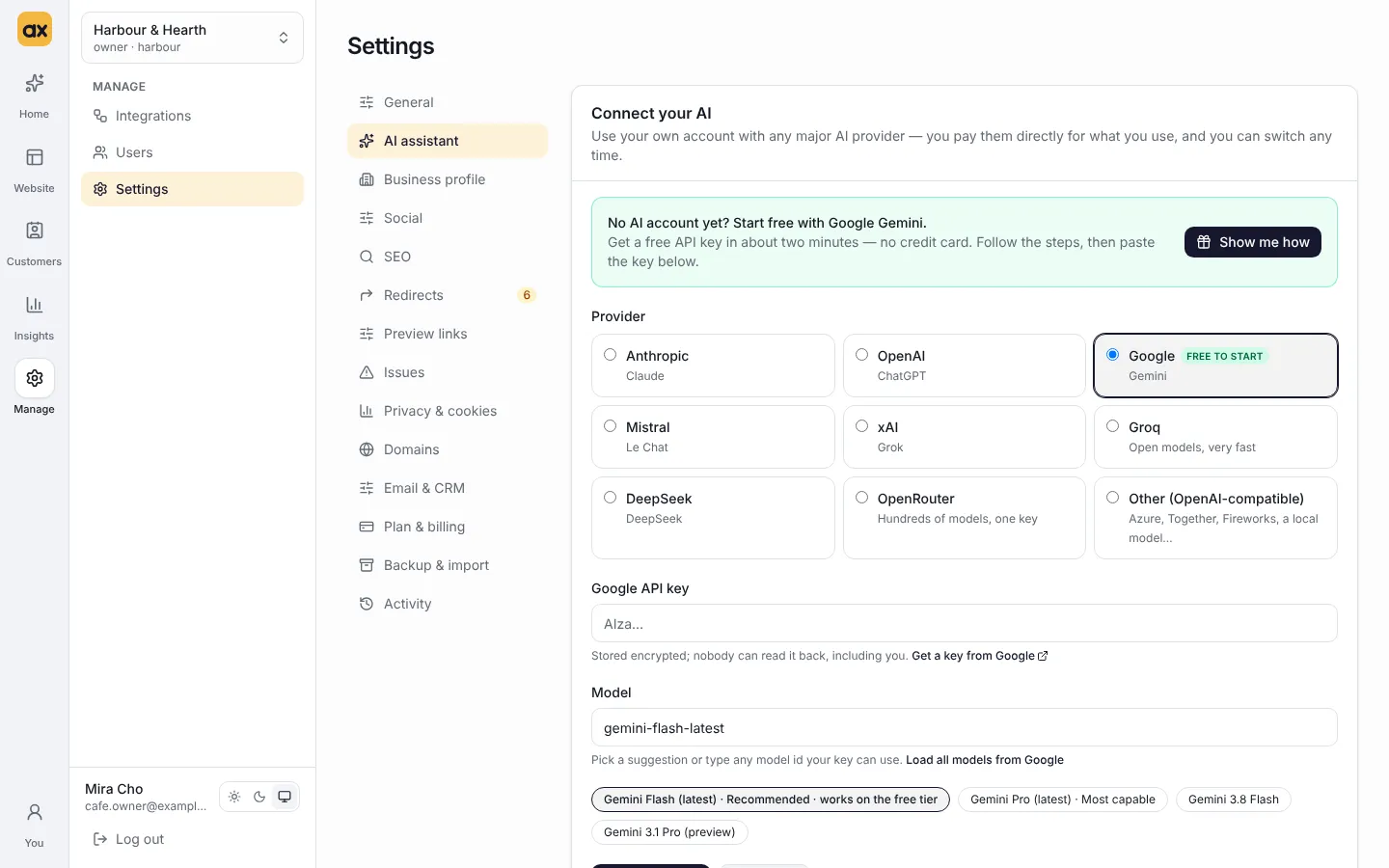
No AI account yet? Start free with Gemini
Google's Gemini API has a free tier — no credit card, just a Google account. In the app, click Get a free Gemini key (on the assistant, on Overview, or Show me how in Manage → AI settings) and a panel walks you through it:
- Open Google AI Studio (aistudio.google.com) and sign in with your Google account.
- Accept the terms if asked and click Create API key. Pick a project, or let it create one.
- Copy the key — it starts with
AIza. - Click I have my key — set up Gemini. AgencyX selects Google and Gemini Flash (latest) for you; paste the key and click Test and save.
Get an API key from your provider
Sign in to your provider's developer site and create an API key. The settings screen links straight to the right page for each one:
| Provider | Known for | Where to get a key |
|---|---|---|
| Anthropic | Claude | console.anthropic.com → API keys |
| OpenAI | ChatGPT | platform.openai.com → API keys |
| Gemini — free tier | aistudio.google.com → Get API key | |
| Mistral | Le Chat | console.mistral.ai → API keys |
| xAI | Grok | console.x.ai |
| Groq | Fast open models | console.groq.com → API keys |
| DeepSeek | DeepSeek | platform.deepseek.com → API keys |
| OpenRouter | Hundreds of models with one key | openrouter.ai → Keys |
| Other | Any OpenAI-compatible service (Azure, Together, Fireworks…) | Your service's dashboard |
Connect it
- Open your website and click Connect AI provider on the assistant, or go to Manage → AI settings.
- Choose your provider.
- Paste your API key.
- Choose a model: click one of the suggestions, click Load all models to see everything your key can use, or type a model's exact name.
- Click Test and save. AgencyX sends one tiny test message first, so a wrong key or model name is caught straight away, with a plain explanation of what to fix.
For Other (OpenAI-compatible), also enter the service's API address, starting with https://.
Start chatting
Click Open the assistant. Everyone on the site who can edit pages can now use it, each with their own private chats. See Build your site by chatting with AI.
Change or disconnect
- Change the model or provider: pick a new one and click Test and save. Leave the key blank to keep the saved one (same provider only).
- Disconnect: click Disconnect. The assistant switches off until a key is added again; chats are kept.
Connecting, changing and disconnecting are recorded in Manage → Activity — without the key.
Common questions
Do I need my own key at all?
Not to get started. Your plan includes built-in AI with a daily allowance for each editor. Connect your own key when you want more — there's no daily limit with your own key.
Do I pay AgencyX for the AI?
Built-in AI is included in your plan. With your own key, the AI provider bills you directly for what the assistant uses, and AgencyX doesn't add a charge.
Is there a free option?
Yes. Google's Gemini API has a free tier with daily limits and no credit card. Click Get a free Gemini key in the app for step-by-step instructions.
Which provider and model should I pick?
Any of them works. To start free, use Google with Gemini Flash. If you're paying anyway, Anthropic with Claude Sonnet is a strong all-rounder; the cheaper "mini", "flash" or "haiku" models are fine for small edits.
Can someone see my API key?
No. It's stored encrypted and is never shown again — not even to you. You only see the last few characters so you know which key it is.
Can I switch providers later?
Yes. Pick another provider or model and click Test and save. Your chats are kept.
Something out of date or unclear? Search other guides or tell us from your dashboard.