Set a page's search title, description and SEO checklist
Write the title and description Google shows, see a live search preview, and work through each page's SEO checklist — headings, alt text, length and links.
On this page
Open the page's settings
Go to Pages and click the page's name. Page settings & SEO is at the top.
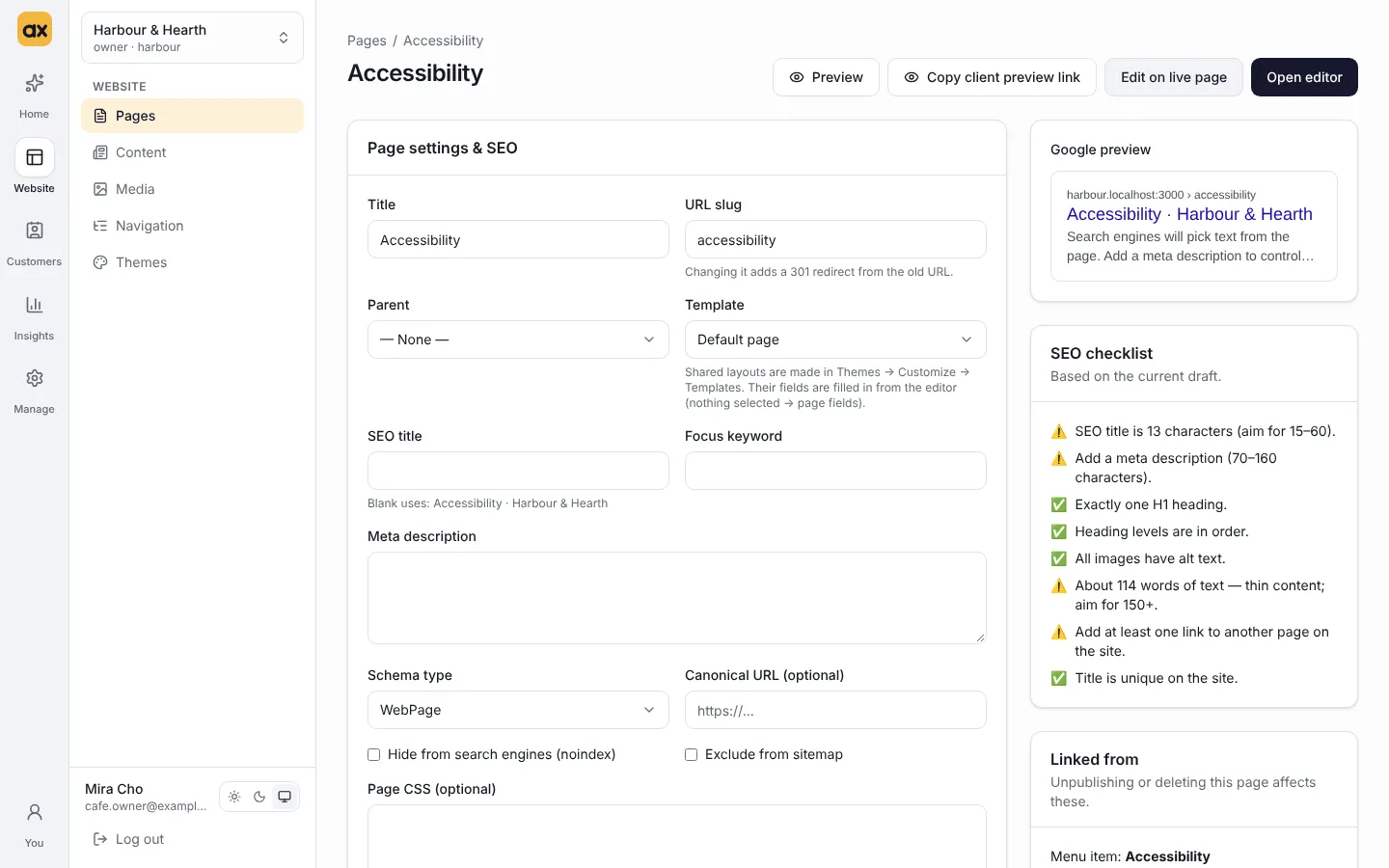
Write the SEO title and meta description
- SEO title — what shows as the blue link in Google. Lead with what the page is about and where: Wedding cakes in Richmond, BC. Leave it empty to use your title template.
- Meta description — the line or two under it. Say what visitors will find and why they should click.
- Focus keyword — the phrase you'd like the page found for. The checklist checks the page against it.
The Google preview shows how the result will look as you type.
Work through the SEO checklist
Beside the fields, the SEO checklist checks the current draft:
- title and description length,
- exactly one main (H1) heading, and headings in order,
- alt text on every image,
- enough words to be useful,
- at least one link to another page on your site,
- a title no other page uses.
Advanced options
- Schema type — what kind of page this is (WebPage, AboutPage, ContactPage, FAQPage…).
- Canonical URL — only if the same content lives at another address.
- Hide from search engines (noindex) and Exclude from sitemap — for pages that shouldn't be in Google.
Click Save settings. Search settings save straight away; they don't need publishing.
Site-wide defaults
Manage → SEO sets the title template (like %s · Harbour & Hearth) and a default meta description for pages that don't have their own.
Common questions
What if I leave the SEO title empty?
Your site's title template is used, usually the page title followed by your site name. You can change the template in Manage → SEO.
How long should the description be?
Around 70 to 160 characters. The checklist tells you when it's too short or too long.
When should I tick “Hide from search engines”?
For pages that shouldn't appear in Google — a thank-you page, a test page or an internal resource.
Something out of date or unclear? Search other guides or tell us from your dashboard.