Connect your own domain name
Use your own address, like yourbusiness.ca. Add the records shown at your domain provider, click Verify, and the secure padlock is set up for you.
On this page
Every site works on its free AgencyX address. On Pro and above, you can connect a domain you own — bought from GoDaddy, Namecheap, Cloudflare, Squarespace or anyone else.
Add the domain
Go to Manage → Domains and click Add domain. Type the address you want visitors to use — we recommend the www version, like www.yourbusiness.ca.
Add the records at your domain provider
AgencyX works out who your domain provider is and shows their steps, with a link to the right page. Then it lists each record to add, with the exact text for the provider's Host box (www, @ or _agencyx-verify.www) and the Value, each with a Copy button:
- Prove you own it — a TXT record.
- Point it at this site — a CNAME (or A) record.
- Secure padlock (SSL) — set up automatically.
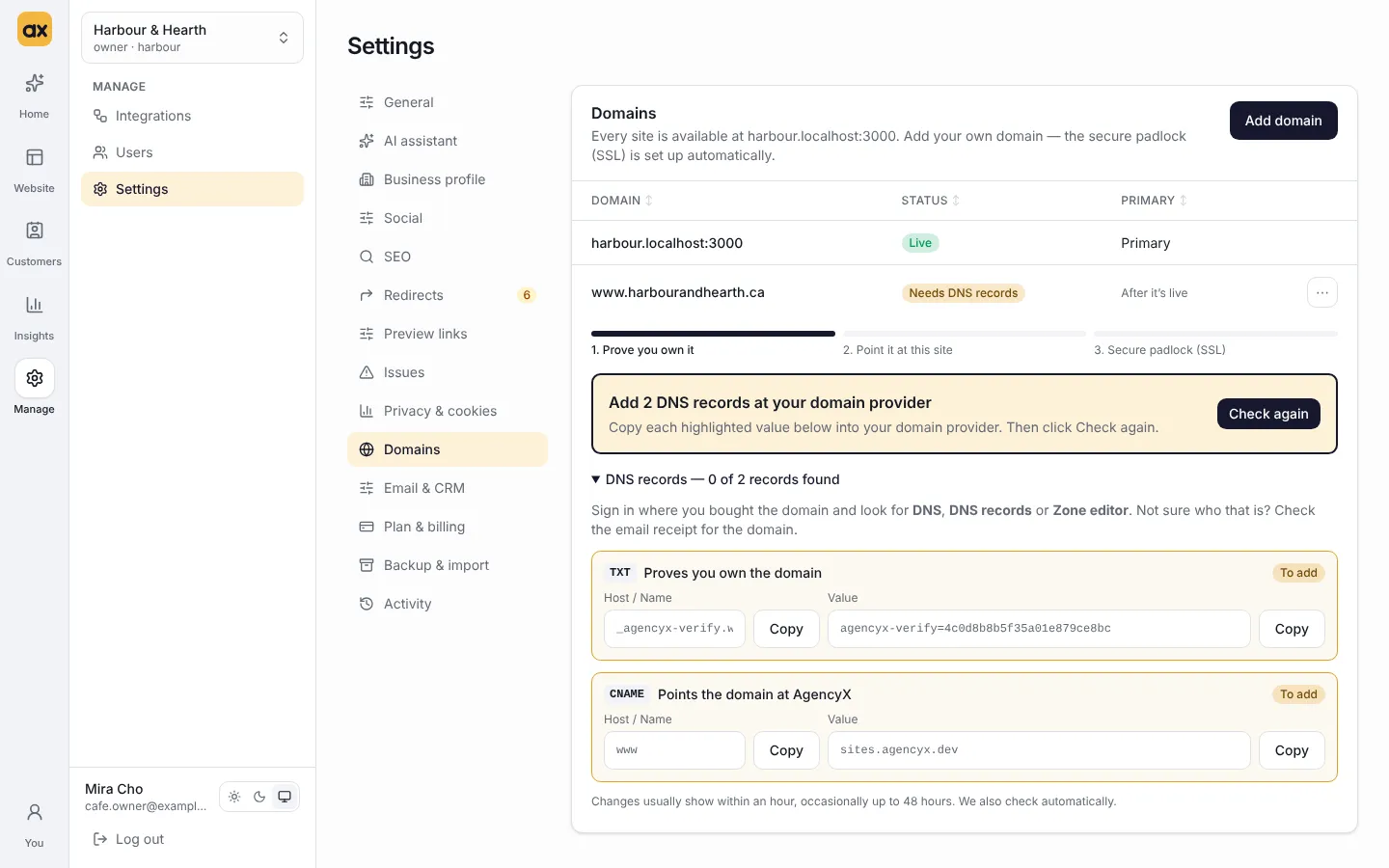
Each record has a live check: ✓ Found, Not found yet or ⚠ Different value (showing what's there now, so you can fix it).
Verify
When the records are found, click Verify. The status moves from pending to issuing (setting up the certificate) to active. You can close the page — it keeps checking.
Make it primary
Once it's active, make it your primary domain. Every other address — your free AgencyX one and any others — then sends visitors to it with a permanent redirect, so Google lists just one.
Troubleshooting
- Cloudflare: switch the records to DNS only.
- Stuck on issuing: delete any leftover AAAA records from your old host.
- Error: fix what the message says and click Verify — it picks up where it left off.
Common questions
How long does it take?
Usually a few minutes once the records are added, but changes at a domain provider can take up to 48 hours to reach everyone. The page checks in the background, so you don't need to keep it open.
I use Cloudflare — anything special?
Set the records we give you to “DNS only” (grey cloud), not proxied, so we can set up your secure certificate.
It's stuck on “issuing”. What now?
Check for leftover AAAA (IPv6) records from your old host and delete them — the domain page tells you if it finds any. Then click Verify again.
What happens to my free AgencyX address?
It keeps working and sends visitors to your own domain, along with any other addresses you add.
Something out of date or unclear? Search other guides or tell us from your dashboard.